
Action digital advice–Live-streaming
Provided by Mimi Arbeit
Sharing your action on social media can add greatly to your narrative reach.
Please note this document was created in 2020 and has been updated, but some information may still be out of date
Prep before the action
- Make a Facebook event
- If you don’t have one already, make a Never Again Action page for your city, like Never Again Action Twin Cities. Make the event with this page as the host so that you’re not hosting the event from your personal account.
- Make sure the title of your event is in line with the messaging around the current action cycle.
- Messages & Photo
- Invite any local partners that are cosponsoring the event as co-hosts
- Invite the national Never Again Action page as a co-host
- Invite people & circulate the event
- Make sure there is information for folks with accessibility needs! A good example of what this looks like: https://www.facebook.com/events/489373111624120/
- Notify Never Again Action nationally so we can support you by writing to your organizer to let us know you are doing an action
- Share widely social media guidelines among organizers & participants (see below)
Roles for the action
- On-the-ground coordinator
- Useful to have someone on the ground to support & coordinate these roles, help people make decisions, get to the right spot, etc.
- Needs to not have another role at the action
- Livestreamer on Facebook
- This person will be the voice of the action to the public! This is a great role for the most inviting, engaging, compelling speaker who’s part of your action. The audience will take emotional cues from them; if they sound excited, the stream is excit-ing, if they sound bored, the stream is bor-ing.
- Prep:
- Bring extra battery pack!!!
- Need enough data available on your phone plan
- Needs to review Meta Narrative & messages to narrate on the livestream
- Give us your FB name to get on #NeverAgain account or local account
- Note: If FB is down, we will use Periscope to broadcast on Twitter
- Prep the caption to the livestream before you start ***use the hashtag*** and include a link to the absorption signup (see examples below) -- Naf can help you
- Make sure your orientation lock is turned off, and hold your phone vertical while you type in the caption and prepare to go live. Right before you hit the blue ‘Start Live Video’ button, turn your phone horizontal and you should see the video preview flip to be horizontal also. Then you can hit the button! Unfortunately people are unlikely to watch vertical video, so we’ll ask you to restart it if it’s vertical.
- Try to be where the action is: film the action, including interaction with cops
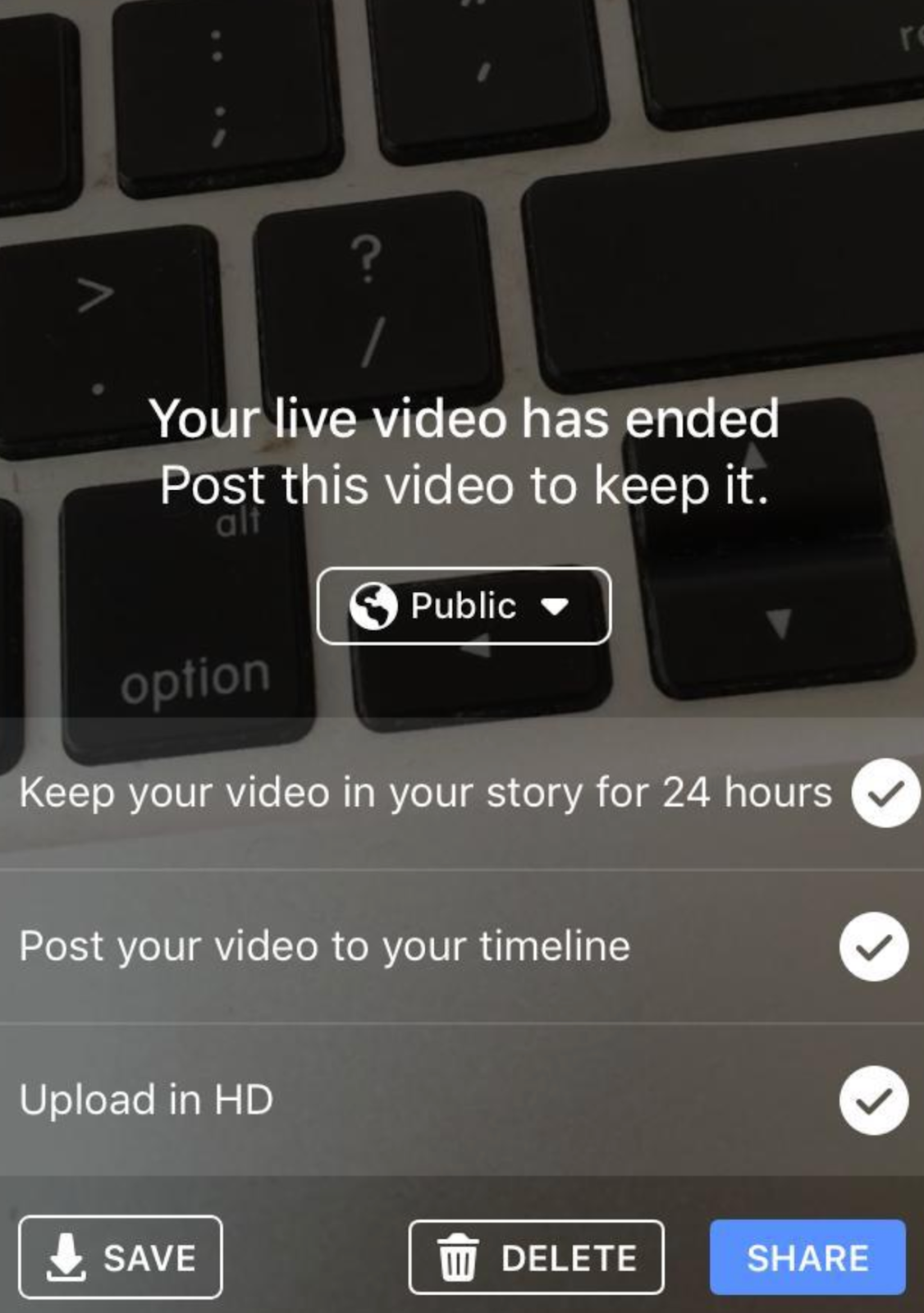
- At end of video - YES upload in HD, looks like this:
-
- See examples
- See also - How to make an action livestream go viral on Facebook - https://docs.google.com/document/d/1T9cwwPQgCFX6O1ZQgxEXmD2f3H6BbpHvX6AptUnGcCY/edit
- Buddy for Livestreamer
- Text communication with the offsite person watching the livestream
- Need extra battery
- Need enough data available on phone plan for texting
- Can also review Meta Narrative & messages to narrate on the livestream
- Also try to keep some situational awareness for safety
- Make sure when the livestream is done that the streamer selects YES to HD
- Offsite person watching the livestream
- One person offsite watching the livestream for video quality -- can you hear/see/etc?
- Text message communication with the livestream buddy
- Great role for someone who wants to support the action but can’t come in person
- Ask us if you need help filling this role (but try to do it locally)
- Smartphone photos & short videos
- Take photos & short videos on your phone
- Share to WhatsApp thread immediately for use (twitter & instagram)
- Make sure to get photos of the main action and any risk-taking or police response
- Try to get photos of speakers along with a quote from what they say (and who they are if that should be shared)
- Feel free to put other updates/quotes/tidbits into the WhatsApp thread for twitter
- Need
- extra battery
- enough storage space on phone to store photos
- enough data available on phone plan to send photos to WhatsApp
- Upload highlights only to Google Drive - up to 10 “highlights”
- See further guidelines
- Narrative & notes writer
- Describe what’s happening at the action, so the livetweeter can write posts that sound like they’re there.
- “He’s passing out the number for the rapid response network in CO for ICE raids, and asking people to fill out postcards in support of the DREAM and Promise Act”
- Describing what a speaker is talking about
- “Evan’s talking about the country’s “long and painful history” of tearing families apart, from the capture and enslavement of Africans, to the ethnic cleansing of the indigenous boarding schools, to Japanese internment”
- Previewing what’s about to happen in the action
- A group of people is going to meet on the corner to march a few blocks, people are being advised that if they do not feel comfortable coming in contact with law enforcement they should probably not join the march
- Providing the names of speakers and compelling quotes
- “Next up is Nadia Cohen, she’s talking about her experience being both Mexican and Jewish.” “People don’t migrate for fun. They’re leaving behind family, they’re leaving being community, they’re leaving behind language and culture.”
- Camera photographer for nicer photos
- Should be in photo/video WhatsApp thread - can mute if needed during action
- Should upload photos to a google drive after the action
- See further guidelines
- Videographer
- NOT live -- take video on phone/camera for future use
- Especially video of the main action and any risk-taking or police response
- Need enough storage space on phone
- Need extra battery
- Get video of people as they get to the parade and take action
- Posting from your local chapter Twitter and Facebook accounts
- Make sure to describe what’s happening in detail and provide context. Assume someone reading it is not familiar with the action and explain!
- Use the hashtags!!!! And review the Meta Narrative.
- Posting from personal BlueSky accounts (optional)
- Great to have a few local folks tweeting from their own accounts
- Should send their accounts to @NeverAgainActn in order to get reposted
- Use the hashtags!!!! And review the Meta Narrative.
Supplementary material - before, during, or after the action
- Video interviews with people directly affected
- Portrait photos of individuals with quotes about why they are here
- Connecting with local influencers to amplify social media
After the action
- Make sure all content has been shared with national digital team (#digital in Slack)
- Set up a time to debrief with your local digital team
- Set up a time for local digital lead & any others to debrief with the digital coach
The local digital team should share WIDELY:
(feel free to edit slightly to fit main messages of your action)
If you’re posting on your own social media...
- Facebook (Never Again Action)
- BlueSky (@NeverAgainActn)
- Instagram (never_again_action)
- #NeverAgainAction
- #NeverAgainParaNadie
- #NeverAgainMeans
- #JewsAgainstICE
No comments to display
No comments to display