
Member Resources Style Guide
A few guidelines to keep things smart and stylish.
For general usage questions, see the official documentation for BookStack (the software this site uses)
Use "Callouts" (found under paragraph/header styles) to add visual punch:
Info: Use this to attribute an article to a source
Success: Great for highlighting winning strategies
Warning: A mild heads up, i.e. some of the info on this page is outdated, or in the process of being cleaned up.
Danger: You can't touch this
For example, mark sensitive documents with the following:
Internal Use Only
Links and attachments
When a link takes you to something like a google document, slide show or a PDF hosted elsewhere, save that item in a reasonably compatible format and upload it as an attachment. Link to the attached version.
If a link is pointing to an external website, use the Wayback Machine at archive.org to grab a snapshot; link to that instead of the live page, in case it goes down or is moved in the future.
Tables
Avoid them! With a little manual effort, tables can be adapted into normal text via indents or bullet lists, which will scale better to different size screens. Tables are a problem for mobile browsers.
Compare the Member-Leader Roles Guide to the original for an example of one way to alter a table-heavy article
Miscellaneous Formatting
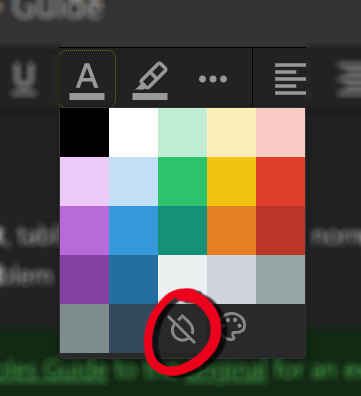
When copying text from an external document, strip the text colors and highlight colors. They interfere with the site theme (especially within Dark Mode).
Delete extraneous line breaks. The site already introduces a generous break between paragraphs, so additional returns add too much negative space.
Tags
Comment
If you're in the process of making changes or considering the best way to proceed, add a comment down below to share your thought process! Once the comment is no longer relevant, it can be archived (in case seeing that past thinking might be useful) or deleted (if it seems like it wouldn't make sense at all without its former context).